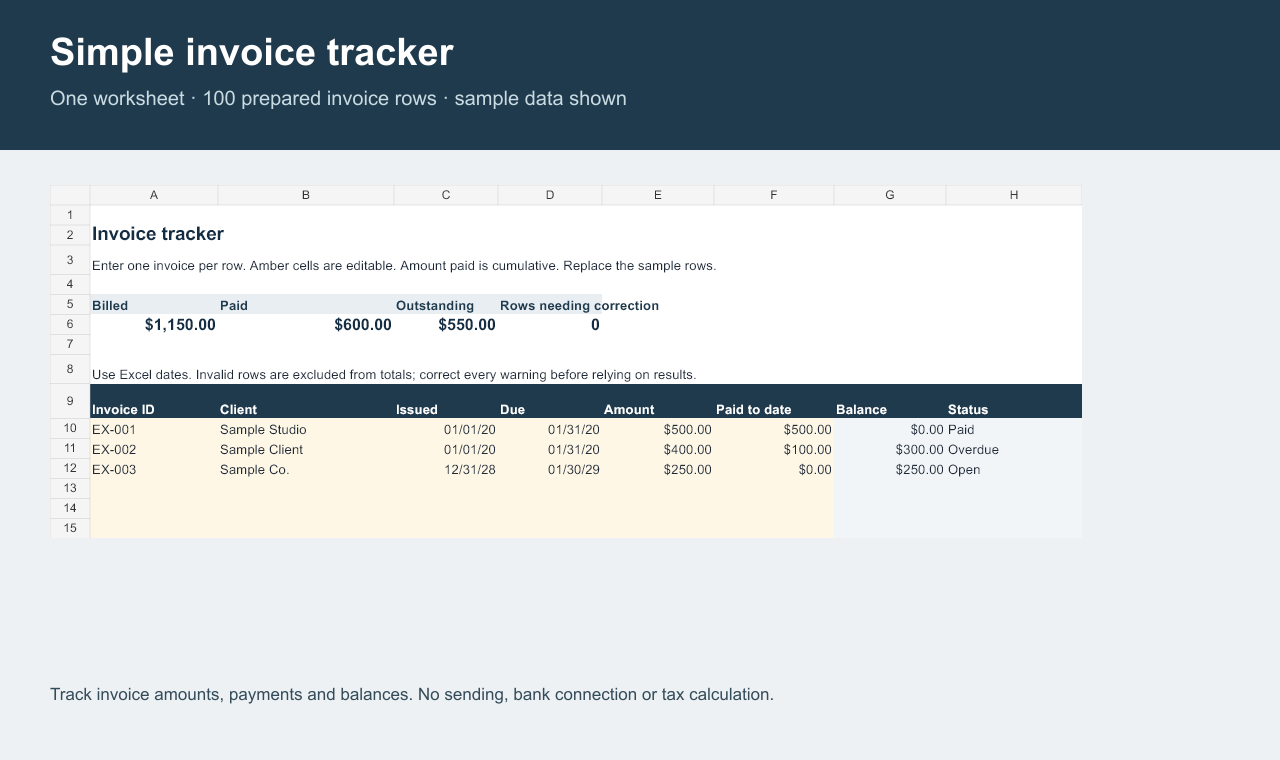
One worksheet with sample entries, calculated balances and status for prepared invoice rows.
See what is paid and still open
- Enter an invoice ID, client, issue and due dates, amount, and cumulative amount paid.
- See the outstanding balance and a paid, open, overdue or input-warning status.
- Review totals for valid rows, with space for 100 invoices.
One Excel workbook
The download includes a single .xlsx file with sample entries to replace. The workbook was tested and recalculated in Microsoft Excel 16.0.
Price: $9. Gumroad processes the checkout and file delivery.
What it does not do
It does not send invoices, connect to bank accounts, calculate taxes, keep a payment history, detect duplicate invoice IDs, or support multiple currencies.
Rows outside the prepared 100-row area are not included in totals. This is not accounting or tax advice.
Designed for a simple log
Use the amount paid field for the cumulative amount received on each invoice. Replace the sample inputs and leave calculated columns intact.
Store any client information securely and make a backup before changing formulas.
Creation disclosure: This spreadsheet and its listing were created with AI assistance and verified through automated checks and native Excel recalculation.